How to Write a Pentest Report
This talk provides a comprehensive guide on structuring and writing effective penetration testing reports to ensure clear communication with both technical and non-technical stakeholders. It outlines the essential components of a report, including executive summaries, detailed findings, and evidence documentation. The speaker emphasizes the importance of providing actionable remediation steps and clear, reproducible evidence to facilitate efficient vulnerability patching. The presentation also covers best practices for data gathering and peer review processes to improve report quality.
Stop Writing Pentest Reports That Nobody Reads
TLDR: Most penetration test reports fail because they treat the document as a compliance checkbox rather than a technical roadmap for remediation. By shifting from a generic, high-level format to an evidence-based, developer-centric structure, you can significantly increase the likelihood that your findings are actually patched. This post breaks down how to structure findings, use reproducible evidence, and communicate risk to non-technical stakeholders without sacrificing technical depth.
Writing a penetration test report is often treated as the administrative tax of the security industry. You spend days or weeks finding critical vulnerabilities, only to dump them into a bloated, unreadable document that gets filed away in a compliance folder and never touched again. If your goal is to actually improve the security of the systems you test, you need to stop writing for auditors and start writing for the engineers who have to fix the mess you found.
The Problem with Traditional Reporting
Engineers do not care about your methodology section or your high-level risk score. They care about how to reproduce the bug and how to fix it without breaking production. When you provide a report that is fifty pages long, filled with fluff, and lacks clear, actionable steps, you are actively working against the people who are supposed to be your allies.
The most effective reports are those that treat every finding as a standalone technical ticket. If a developer can take your finding, follow your steps to reproduce it, and understand the impact without having to email you for clarification, you have done your job.
Structuring Findings for Impact
Every finding in your report should follow a consistent, predictable structure. If you are using a template, ensure it includes these core components:
- Title: Keep it descriptive. Instead of "Buffer Overflow," use "Remote Code Execution via RPC Interface Buffer Overflow."
- Tracking Number: Assign a unique ID to every finding. This is non-negotiable for tracking remediation status across multiple testing cycles.
- Severity Ranking: Use a standard like CVSSv3 to provide a baseline, but always include a qualitative risk assessment that explains the business impact.
- Description: Explain the vulnerability in simple terms. Assume the reader is an engineer, not a security researcher.
- Steps to Reproduce: This is the most important section. If you cannot provide a clear, step-by-step guide to trigger the vulnerability, you have not finished your work.
- Evidence: Include screenshots or logs. If you are showing a command-line interaction, highlight the specific input or output that proves the vulnerability exists.
- Affected Location: Be specific. Provide the exact URL, IP address, or file path.
- Recommended Remediation: Provide multiple options if possible. If the primary fix is a major architectural change that will take months, provide a short-term mitigation that reduces the risk immediately.
The Mechanics of Evidence
When you demonstrate a vulnerability like the CVE-2003-0352 buffer overflow, the evidence you provide is the difference between a quick patch and a "cannot reproduce" ticket. In your report, do not just paste a wall of text from your terminal.
Use a code block to show the exact command used to trigger the exploit:
# Example of a clear, reproducible command
dcom exploit -t 192.168.1.75 -m 666 -r 1024
After the command, include a screenshot of the resulting shell or the specific error message that confirms the overflow. If you are using tools like Metasploit or Netcat, make sure your evidence clearly shows the transition from the initial request to the successful exploitation. If you are using a tool to upload a payload, highlight the specific line in the file listing that confirms the file was successfully written to the target system.
Communicating with Non-Technical Stakeholders
Leadership often reads the executive summary and nothing else. This section should be a single page that summarizes the overall health of the environment. Use visual aids like charts to show the distribution of vulnerabilities by severity. If you see a trend, such as a recurring lack of input sanitization across multiple services, call it out explicitly.
This is your chance to influence the security budget. If you can show that 80% of the critical vulnerabilities found were due to a single, preventable issue, you provide a clear argument for investing in better developer training or automated testing tools.
The Peer Review Process
Never send a report without a peer review. Even the best researchers make mistakes, and a second set of eyes can catch missing steps in your reproduction guide or clarify language that might be misinterpreted by a developer. If your firm has a QA process, use it. If you are a freelancer or a solo researcher, find a colleague to review your work.
A good peer reviewer will ask the hard questions: "Is this step actually necessary?" or "Does this screenshot clearly show the vulnerability?" If they cannot follow your report, the developer definitely won't be able to.
Final Thoughts on Remediation
Your job does not end when you submit the report. The goal is to get the vulnerability patched. If you find that a specific team is struggling to implement your recommendations, offer to jump on a call to walk them through the fix. Building a reputation as a researcher who provides high-quality, actionable reports will make your findings more likely to be prioritized.
Stop treating the report as a final exam. Treat it as a collaboration tool. When you make the developer's life easier, they will make your findings a priority.
CVEs
Vulnerability Classes
Tools Used
Target Technologies
All Tags
Up Next From This Conference

BSides Salt Lake City Conference Opening
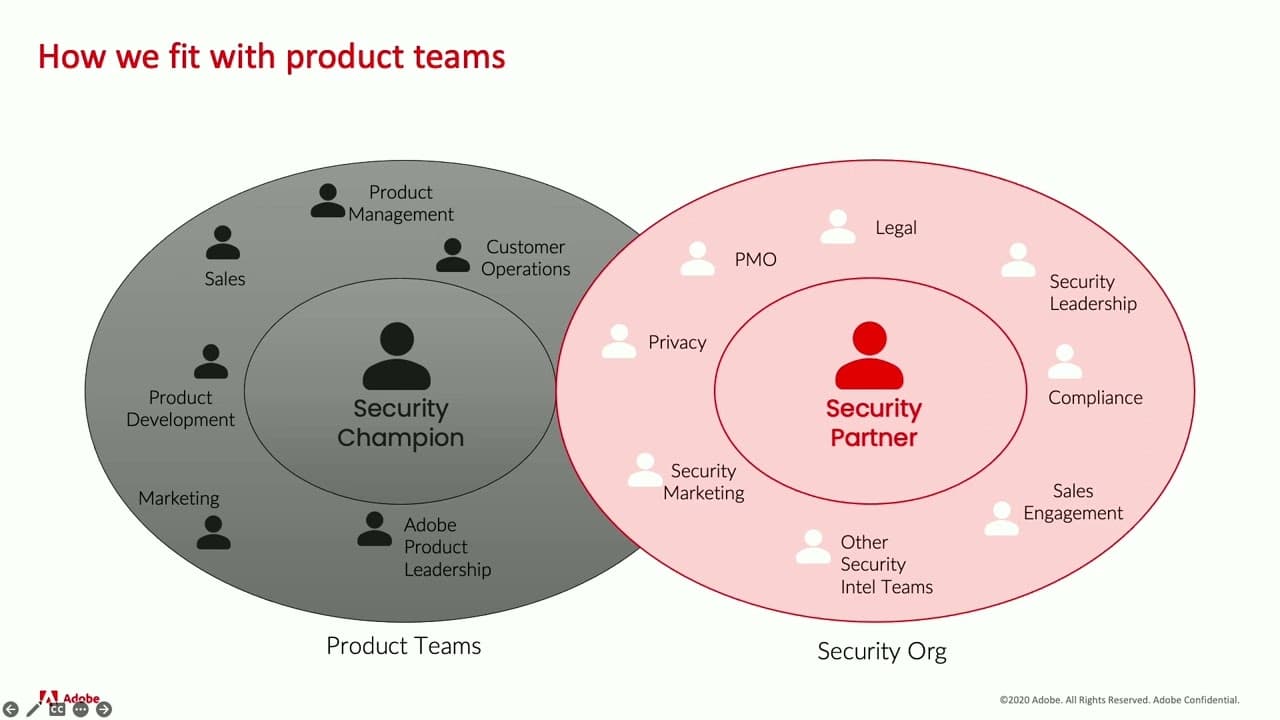
Building Stronger Relationships between Security and Engineering Teams